Catch Phishing That Passes DMARC From Microsoft's Own Address
Michael Robertson ·
Since mid-October 2026, phishing has been arriving from Microsoft’s real notification addresses, quarantine@messaging.microsoft.com and microsoftoffice365@messaging.microsoft.com. Microsoft 365 uses these addresses for quarantine and encrypted-message notices. The lures pass SPF, DMARC and Microsoft’s own sender checks, so most mail apps show no warning. A strong DMARC policy at the receiving end will not stop them either. In a 30-day hunt across the organizations we monitor, these lures reached 27% of them between 13 and 21 October 2026.
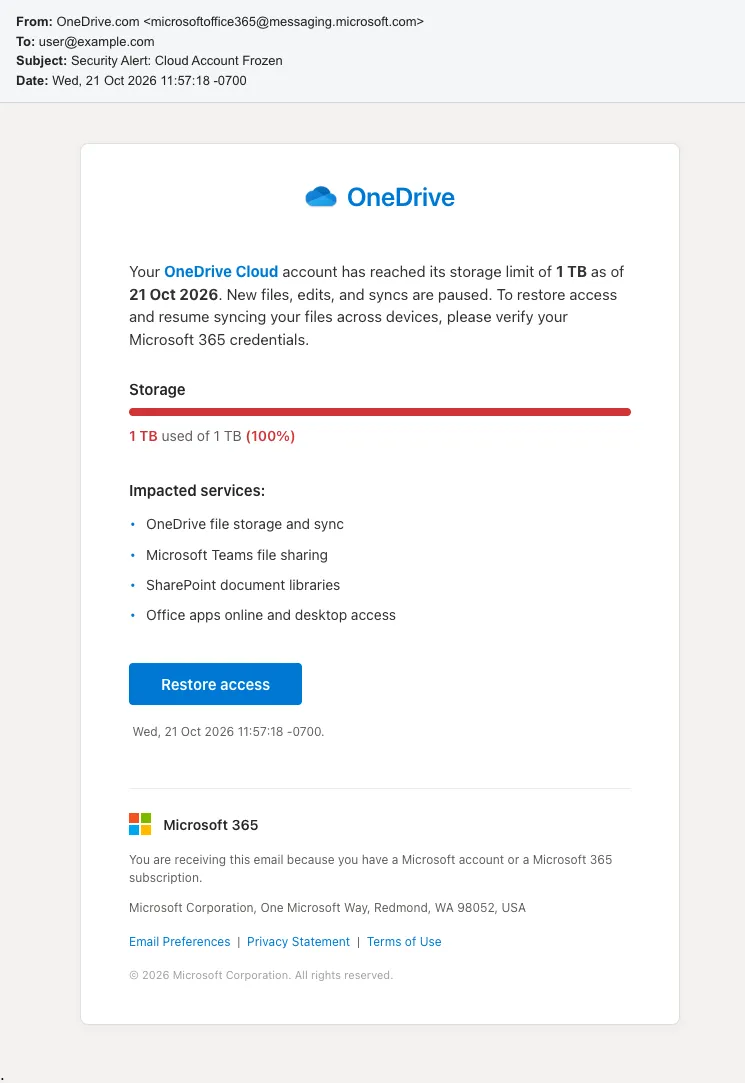
One of the lures, from microsoftoffice365@messaging.microsoft.com. Sanitized.
What to do
Quarantine mail Microsoft didn’t sign. Microsoft’s genuine notices from messaging.microsoft.com are DKIM-signed by notification.microsoft.com. These lures are unsigned or signed by another tenant’s domain, so quarantine any that lack that signature. Match on the signing domain, not on DKIM passing, because a gateway in front of Exchange Online can break the genuine signature. Keep “Honor DMARC record policy” on in your anti-phishing policy, as Microsoft recommends: it still rejects plain spoofs of this address.
Flag the attribution header.X-MS-Exchange-CrossTenant-OriginalAttributedTenantConnectingIp was on every lure we examined and on none of the genuine notices we compared. A sender can supply it, so treat it as a campaign signal alongside the DKIM check rather than proof on its own. Our Sublime detection rule, severity high:
Recon - Microsoft Messaging Domain Relayed Through Attributed Tenant
type.inbound
// sent from the shared microsoft exchange online messaging domain
and sender.email.domain.domain == "messaging.microsoft.com"
// exchange online names the tenant it attributed the connection to
Block or quarantine HTML attachments. Some lures carried .htm files named like PDFs that redirect the browser to an outside site. Stop inbound .htm and .html attachments where your business allows it.
Use phishing-resistant MFA, such as passkeys. If someone entered their password, reset it, revoke their sessions, and check for new MFA methods, inbox rules and app consents.
Don’t block the domain. Microsoft’s real quarantine and encrypted-message notices use it.
For your users: a real Microsoft sender address doesn’t prove an email came from Microsoft. Check storage or account status by opening OneDrive or office.com directly, not through a link.
Why these messages pass
The messages are relayed through a Microsoft 365 tenant. Exchange Online accepts them even though they fail DMARC on the way in, then sends them on from Microsoft’s own servers with Microsoft’s address left in place. Every check after that sees what looks like genuine Microsoft mail.
The headers show each step:
Signal
Observed
Envelope sender and From
Both messaging.microsoft.com; no SRS rewrite
Final result at the recipient
spf=passdmarc=passcompauth=pass reason=100. Compauth is Microsoft’s composite authentication result. This is an aligned SPF pass, not an ARC override (that would be reason=130).
First hop, where retained
Non-Microsoft IP into Exchange Online: spf=faildmarc=fail action=oreject, recorded in the first ARC (Authenticated Received Chain) header, ARC-Authentication-Results: i=1
Why SPF passes later
messaging.microsoft.com’s SPF includes spf.protection.outlook.com, so every Exchange Online outbound address is authorized
Tenant attribution
X-MS-Exchange-CrossTenant-OriginalAttributedTenantConnectingIp names a Microsoft 365 tenant, the connecting IP and the HELO name it gave
DKIM
Unsigned, or signed by an onmicrosoft.com tenant domain. The genuine notices we compared are signed by notification.microsoft.com.
At the first hop, action=oreject means Exchange Online saw Microsoft’s p=reject policy fail and did not reject the message. Microsoft documents that result when the relaying tenant has “Honor DMARC record policy” turned off, or an allow list overrides it. Why Exchange Online then neither rewrote the envelope nor used its relay pool is the question we’ve put to Microsoft.
This is also why DMARC cannot help the recipient. Your own DMARC record protects only mail that claims your domain, so it has no say over mail from messaging.microsoft.com. Honoring the sender’s policy doesn’t help either: Microsoft already publishes p=reject, and by the time these lures reach you they pass it. The only DMARC failure happened at the first hop, inside the tenant that relayed them.
In June 2026, ZeroBEC showed attackers sending phishing from this sender through a Microsoft 365 tenant. In their sample, Exchange Online rewrote the envelope sender (the Sender Rewriting Scheme, SRS) and the message failed DMARC (compauth=none reason=451). The messages we found were not rewritten, and they pass.
Appendix
Screenshots
All lures were sent as messaging.microsoft.com between 13 and 21 October 2026. Each is sanitized. The recipient is user@example.com, links are disabled and remote images are removed.
Each caption names the display name the lure used, the Microsoft address that sent it, and what its link or attachment does.
“OneDrive.com” from microsoftoffice365@. The link leads to a credential phishing page.
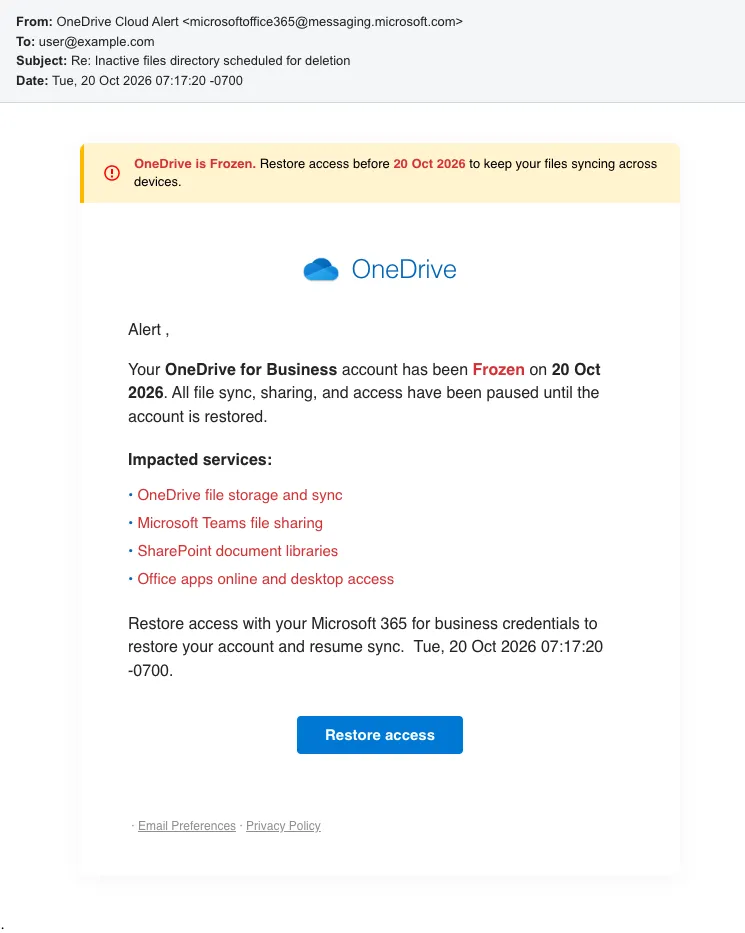
“OneDrive Cloud Alert” from microsoftoffice365@. The link leads to a credential phishing page.
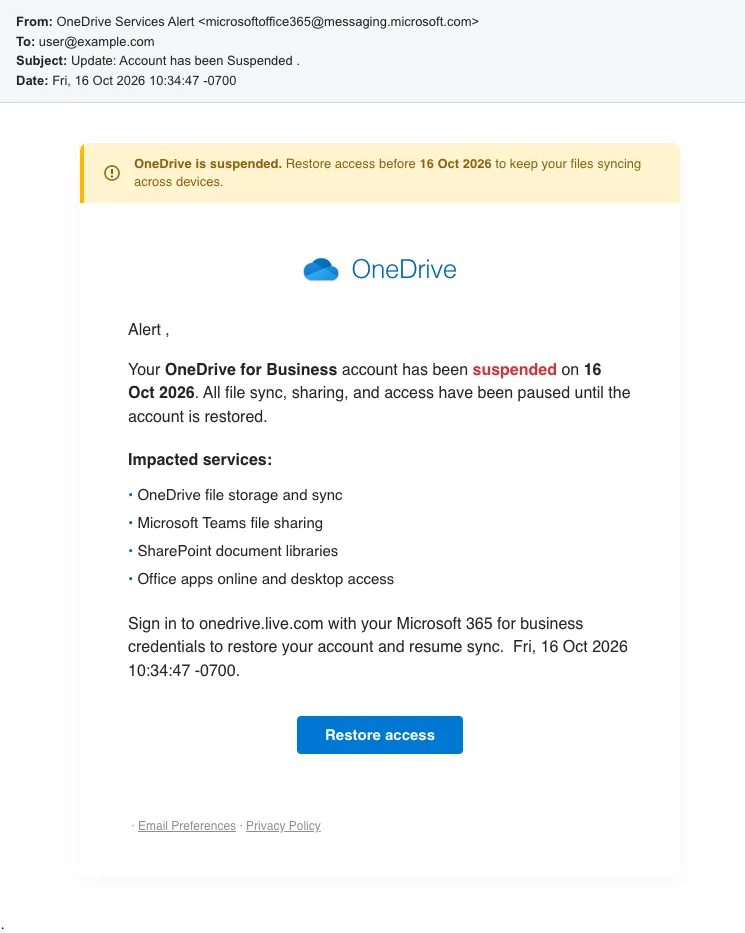
“OneDrive Services Alert” from microsoftoffice365@. The link leads to a credential phishing page.
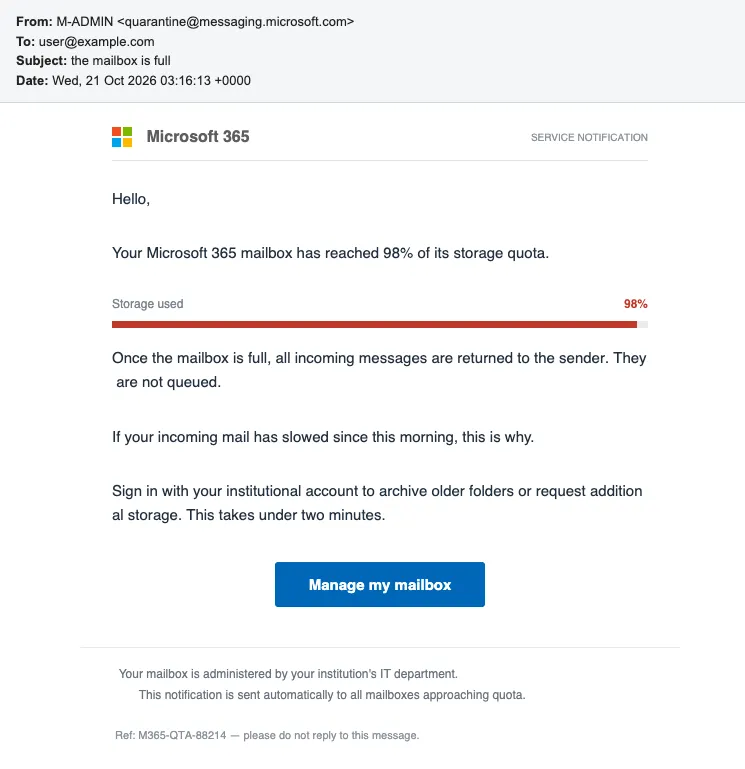
“M-ADMIN” from quarantine@. The “Manage my mailbox” link redirects to an outside site.
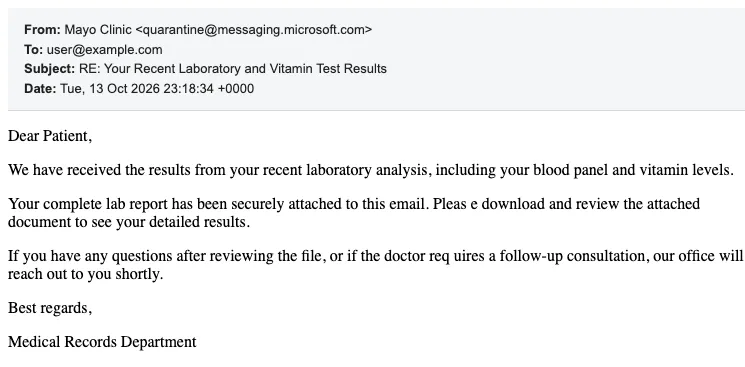
“Mayo Clinic” from quarantine@. The attached .htm file redirects the browser to an outside site.
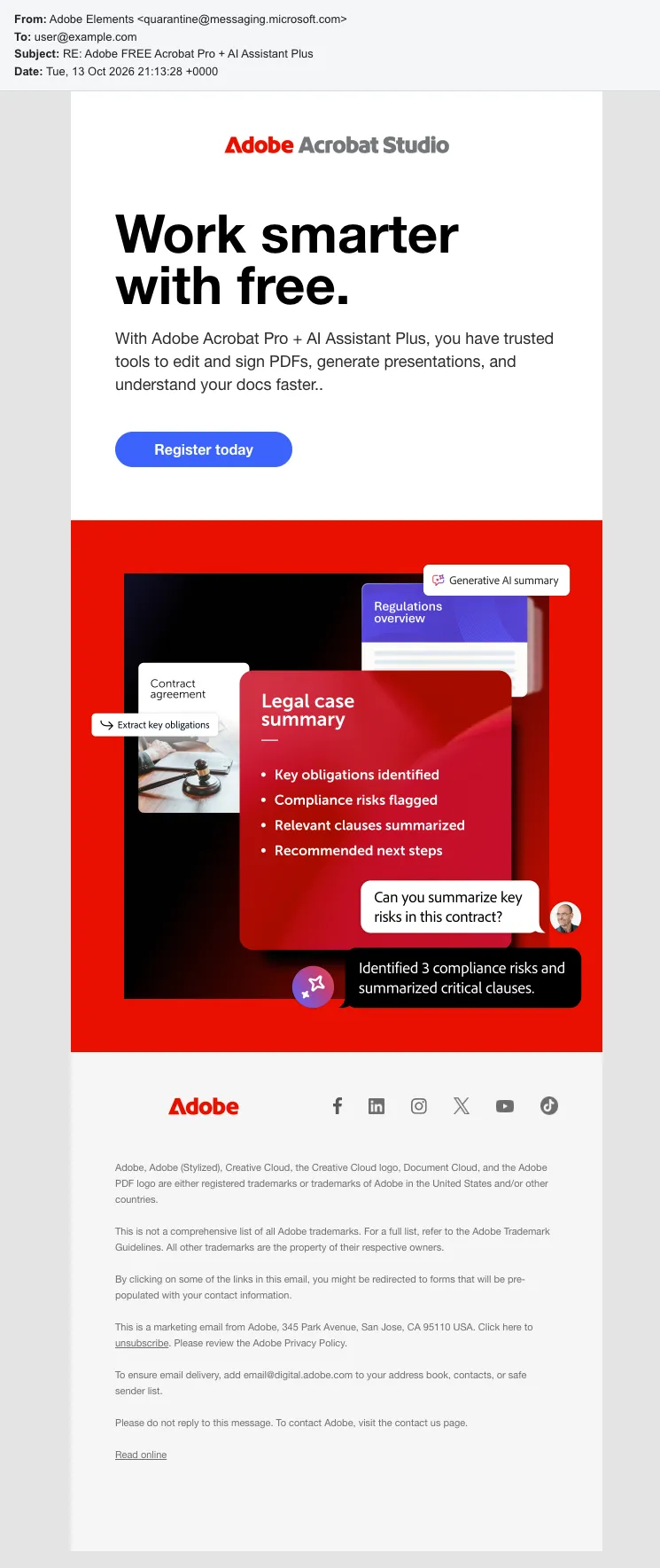
“Adobe Elements” from quarantine@, a copy of an Adobe marketing email. Its links redirect to an outside site.
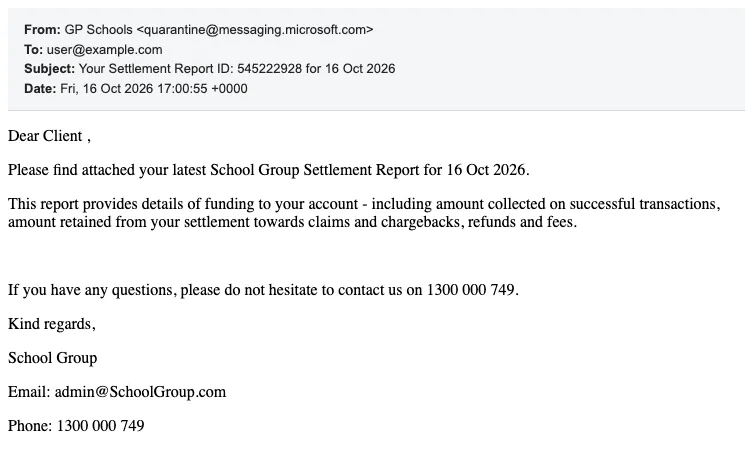
“GP Schools” from quarantine@. The attached .htm file redirects the browser to an outside site.
Indicators
Values are defanged (hxxp, [.]). Each block’s copy button copies the whole list, one value per line.
In the same order, the file names were Medical-PDF.PDF_<digits>.htm (the first three), Report___PDF.PDF_____<digits>.htm and Report-PDF.PDF_<digits>.pdf.
Credential phishing link hosts (OneDrive lures)
hxxps[://]managements-center.audiogears[.]asia
hxxps[://]openid-connect.aftermiracleplus[.]asia
hxxps[://]hrtwsupport.ezsports.com[.]tw
hxxps[://]ftpmanager.convencioniberoamerica[.]com
hxxps[://]account.romisingh[.]com
The first four take a query string; account.romisingh[.]com uses a path form:
edo.undo[.]it served the Mayo Clinic and Adobe Elements lures, gigghauxbkxld the GP Schools lure, and the other mastbusiness[.]com hosts and ctrkklclick[.]com the M-ADMIN lure. Each takes a path of /<token>, except ctrkklclick[.]com, which uses /l/<id>; it is a lookalike of Klaviyo’s click tracker ctrk.klclick.com, registered 2024-09-24.
Subjects
Security Alert: Cloud Account Frozen
Warning: Inactive Files Directory Will Be Deleted
Re: Inactive files directory scheduled for deletion
Urgent: Important: Account Temporarily Suspended
Update: Account has been Suspended .
the mailbox is full
RE: Your Recent Laboratory and Vitamin Test Results
RE: Adobe FREE Acrobat Pro + AI Assistant Plus
Your Settlement Report ID:545222928 for 16 Oct 2026
Re: No - 000000
Display names
OneDrive.com
OneDrive Cloud Alert
OneDrive Services Alert
M-ADMIN
Mayo Clinic
Adobe Elements
GP Schools
SchoolGroup.com
The first three were sent from microsoftoffice365@, the rest from quarantine@. “SchoolGroup.com” has no screenshot.
Tracking image hosts (OneDrive lures)
hxxp[://]65.bacan4d[.]skin
hxxp[://]energybankinc.lgdusallc[.]net
Both tracking URLs end ?q=o&s=<token>.
Do not block
These legitimate services appear in the lures:
messaging.microsoft.com, including both sender addresses above: Microsoft’s own notification domain. Match on display name or DKIM instead.
data.digital.adobe.com and landing.adobe.com: Adobe click tracking and image hosting.
cdn.klaviyomail.com: Klaviyo image hosting.
ctrk.klclick.com: Klaviyo’s shared click tracker. The “M-ADMIN” lure rides a Klaviyo account, so key on its company path VtpRdw, not on the host.
Phishing campaign exploits Zoom Events infrastructure to deliver credential phishing and malicious downloads, bypassing email security filters. Learn how to protect your organization.